200 of 500 feet completed
- Crew hours
- 40
- Allowed
- 150
- Remaining ft
- 300
Progress you can
come back to.
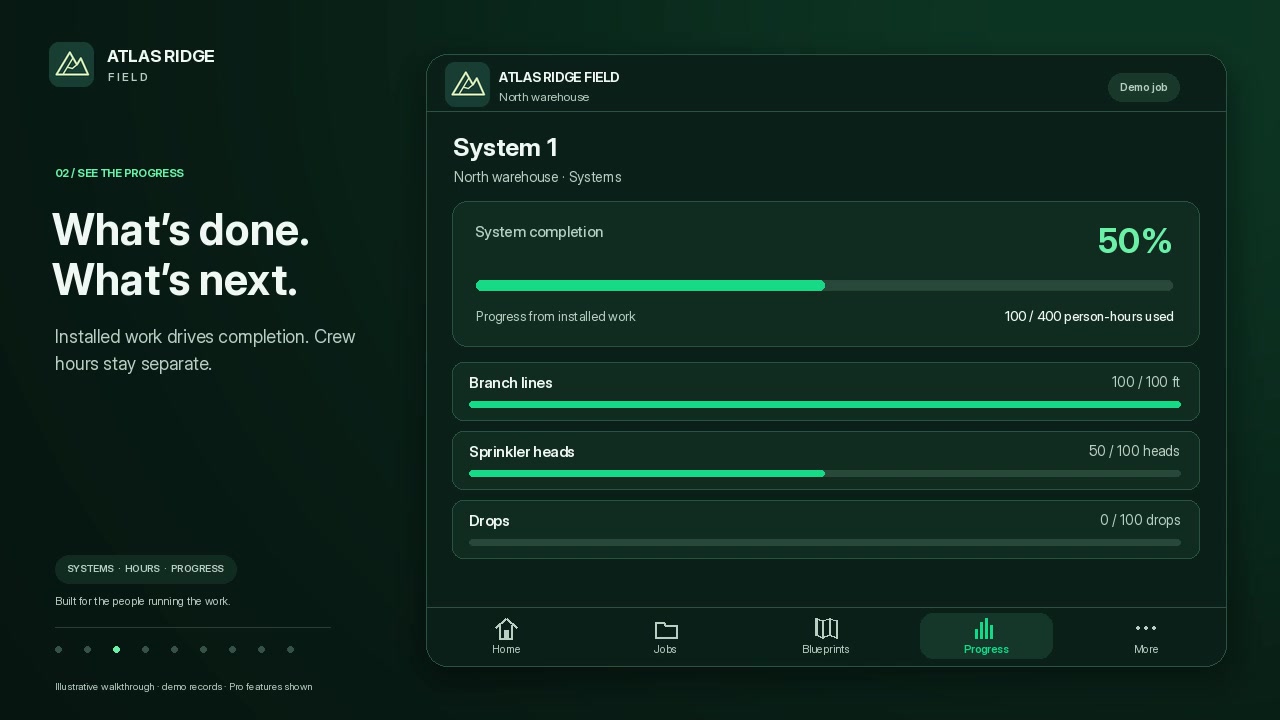
Open saved work in Progress. Edit its details, add the next update and keep the quantity and hour history together.
Explore ProgressFOR THE PEOPLE RUNNING THE WORK
Know what’s done.
See what’s next.
Keep the whole crew moving.
Hours, progress, deliveries and Atlas AI.
One clear picture of your job.
Free to start. No card needed. Built for every trade.
 Watch Atlas in actionTurn the sound on for a guided tour
Systems, crew hours, drawings, deliveries, Atlas AI & reports.Illustrative walkthrough · demo records · Pro features shown.
Electrical · HVAC · Plumbing · Fire protection · Concrete · Drywall · And yours.
See completed work, keep deliveries straight and find the record when you need it.
200 of 500 feet completed
Open saved work in Progress. Edit its details, add the next update and keep the quantity and hour history together.
Explore ProgressKeep expected deliveries separate from material actually received.
Record what arrives, see what is still outstanding and set a reminder to follow up.
Explore DeliveriesDescribe the shift in your own words. Review the details and choose where to save the work.
Try a trade examplePhoto estimates with short questions, confirmed costs, tax choices, and editable drafts—all in Business Pro. Start with photos, check measurements, and review before sharing.
Explore photo estimates + unlimited AINo daily or monthly AI cap. No per-request charges. Short request-rate limits protect availability.
Pick an example. See how the words
become hours and measured work.
“Three of us worked eight hours on Level 2. We installed 18 light fixtures today. Draft the hours and progress.”
Your words. Your units. Track fixtures, feet, sheets, cubic yards, squares or another measure.
No total scope was given, so the target stays unknown. Eighteen installed does not mean the job is 18% complete.
Examples are illustrative. Review important details. Clear updates can save automatically when chat auto-save is enabled; unclear details wait for confirmation.
Start with free job records.
Add the tools that earn a place in your day.
$0to get started
$9.99/ month
$29.99/ month
USD, plus applicable taxes. Paid plans renew monthly until canceled. Business Pro includes Pro; one paid plan per person. Short request-rate limits protect unlimited AI availability. Compare benefits & limits ↗
Organized. Ready for your review.
300 person-hours remaining
Completion from activities. Crew hours counted once.
Review remaining work before the deadline.
Confirm the next move with your crew.
Warnings from saved deadlines and job records.
Follow a fictional warehouse job from a field update to a plan and a report. Switch views to see how the details connect.
“Three of us worked 8 hours. We installed 18 of the 60 planned light fixtures. Forty of the 60 fixtures arrived.”
This sample combines hours, completed work and a material receipt. Atlas can draft hours and progress; record actual arrivals in Deliveries → Record received.
Try Atlas with your own jobA target stays a target. Only completed work counts toward progress.
Tomorrow’s finish needs the remaining 42 fixtures. Only 40 have been received, with 18 already installed, and the remaining delivery is expected a day after the task.
Lookahead connects saved task requirements with material receipts and expected dates. It gives you a follow-up plan you can download.
Explore all Pro tools60 ordered · 40 received · 18 installed
Delivery is after the task · timing unconfirmed
Bring measured work, hours, material balances and field notes into a dated report. Download it, print it, or save it as a PDF from your browser.
HTML report · fictional records · no sign-in
 ATLAS RIDGE FIELD
October 14, 2026 · One shift
Confirm the missing 20 fixtures before the remaining lighting work. Expected delivery is not a receipt.
Use your own units and organize the job by systems, zones, floors, areas or column lines. Atlas is built for foremen, superintendents and contractors across the trades.
Yes. Use Atlas in your phone or computer browser. Shared jobs require an internet connection. We’re preparing the native iPhone app for release. You can start on the website today.
No. Create a free account and begin with manual job records. A paid subscription starts only when you choose to purchase one.
Job Pulse shows attention warnings while you use Atlas. Website push notifications are not enabled. Scheduled reminders and calendar notifications are separate.
Get help with Atlas Ridge Field, your account, or Business Pro.
Start free. Bring your crew. Keep the record.